Which free AI pixel art generators allow commercial use?
Short answer: three of the four AI pixel art generators we checked let you use free-plan art in a game you sell: PixelLab, Retro Diffusion and SpriteCook. Spritefy Free is personal, non-commercial use only. The free allowances are small, and Retro Diffusion and SpriteCook can show free outputs publicly. For free tiles with no account at all, use CC0 packs from Kenney. Checked on official pages on November 16, 2026.
Free AI art tools have three separate limits: how much you can generate, what you can download, and what the license lets you do with the file. The word free usually describes only the first one. Pixel art adds a fourth trap: many "pixel style" images are not on a real grid, so they look blurry in a game engine. Here is what each tool's own pages say, plus the free fixer we tested.
Free plan vs commercial use: the quick table
| Tool | Free plan | Downloads or exports on free | Commercial use on free | Attribution |
|---|---|---|---|---|
| PixelLab | Free trial, no card: 40 fast generations, then 5 slower ones a day (store up to 20), up to 200x200 pixels. Map tools not included. | Not stated. The pricing table does not list file formats, and we did not test a download. | Yes. Listed on the free trial. Terms say you own your creations. Do not train other models on them. | No credit clause in the Terms we read. |
| Retro Diffusion | Free starting balance, no card. Pricing page: $0.50 (16 RD Fast or 2 RD Pro images). Home page: free daily usage, about 3 RD Pro images to start. | Yes, per its site: downloads at true 1x size or upscaled. Free browser tools (Pixel Art Fixer and 10 more) need no signup; we tested the fixer. | Yes. Terms say you own your outputs, and the FAQ says personal and commercial projects. Free usage outputs may be shown publicly. | No credit requirement found. Terms say attribution is not required even for apps built on it. |
| SpriteCook | $0, 40 credits every 30 days, no card. An image costs 8 to 12 credits, an animation 20 to 26. 10 saved assets. | PNG and ZIP: yes. Sprite sheet, Unity, Godot and Phaser exports need Starter ($12 a month). | Yes, on every plan including Free. Free generations appear in the public gallery. | Not required. Its AI model providers' terms also apply. |
| Spritefy | 80 one-time starter credits, no card, 1 active generation. No animation or audio on Free. | PNG exports listed on Free. GIF from Starter, WAV on Pro. | No: personal, non-commercial use, public by default. Commercial use from Starter, 19 euros a month. | No credit clause found. Free use is non-commercial anyway. |
| Kenney pixel packs (CC0) | Free, no account. A donation prompt is optional. | Yes: our Tiny Dungeon zip had 132 16x16 tiles plus two tilemaps. | Yes: CC0 public domain, commercial projects allowed. | Not required. Crediting Kenney is optional. |
Checked November 16, 2026 on each tool's pricing page, terms and FAQ (links in the sources at the end). We did not create accounts or pay for anything. Prices and limits change often, so check the pricing page again before you rely on a number.
What each tool's rules mean for your game
PixelLab: commercial use on the free trial
PixelLab is built for game pixel art: sprites, items, rotations, inpainting and basic text animation are all on the free trial. Its pricing table lists Use generated images commercially on every tier, including the free trial, and explains that you can use generations commercially in your games and other projects, and that you own the rights except for training models. Its Terms of Service (last updated October 30, 2026) say the same in sections 1.3 and 3.3. The FAQ adds that you are allowed to use its AI assets on Steam, and that PixelLab does not store generated images unless a tool says so. Paid tiers start with Pixel Apprentice at $12 a month for 2,000 generations, images up to 320x320, skeleton animation and map tools. We did not sign up, so we have not checked what file types a free download gives you.
Retro Diffusion: pay per image, free tools with no signup
Retro Diffusion has no subscription. You top up from $5 and pay per image: RD Fast $0.03, RD Core $0.10 and RD Pro $0.18, with Advanced Animations from $0.10 a run. The balance never expires and failed generations are refunded. New accounts get free balance with no card, but the two official pages disagreed on November 16, 2026: the pricing page said $0.50 (16 RD Fast or 2 RD Pro images), and the home page FAQ said free daily usage, about 3 RD Pro images to start and more every day. Either way it is a taste, not a production budget. The FAQ says you own your outputs and can use them in personal and commercial projects. Its Terms (last updated September 28, 2026) say outputs belong to the person who generated them, that outputs made with free usage may be displayed publicly and in Retro Diffusion promotion, and that you may not use outputs to train AI models. The best free part is the toolbox: the Pixel Art Fixer, color reducer, palette converter, outline, rotate and sprite sheet tools run in your browser with no signup and no watermark.
SpriteCook: commercial use on Free, public gallery
SpriteCook makes pixel art or HD 2D sprites, animations, tilesets and UI. The Free plan gives 40 credits every 30 days, which is about three images at the default 12 credits, or one or two animations. Every model and mode is on Free, and you can download PNG and ZIP files. The pricing page answers the license question directly: commercial use on every plan, including Free, with no need to credit SpriteCook. The catch is privacy: free generations appear in the public gallery, and private assets start at Starter. Starter is now $12 a month for 1,000 credits (it was $8 for 800 when we checked on October 31; the page says existing subscribers keep their old price) and adds Unity, Godot, Phaser and sprite sheet exports. Its Terms (effective November 12, 2026) say you may use, reproduce and distribute your outputs, that outputs may not be unique, and that the terms of its model providers (it names OpenAI, Google Gemini and xAI) also apply.
Spritefy: good free test, not for a game you sell
Spritefy gives 80 one-time starter credits with no card, which its pricing page says is enough for two characters or one effect, and lists PNG exports. But its pricing page and Terms (last updated November 9, 2026) say Free outputs are for personal, non-commercial use and public by default, and since November 3, 2026 they may also appear in Spritefy's marketing. A credit pack bought on Free does not change that licence, and a later upgrade does not automatically relicense older Free outputs. Commercial use starts on Starter at 19 euros a month (2,000 credits, private assets, animation). Use the free credits to judge the style, then pay for a month before you make the art that ships.
Kenney: CC0 pixel tiles you can ship today
Kenney is a free asset library, not an AI tool, but it is the simplest answer if you need pixel art you can sell for $0. Kenney's support page says all assets on its asset pages are CC0, free for commercial projects, and attribution is not required. The Tiny Dungeon pack page lists 16x16 tiles under Creative Commons CC0. Want more variety? OpenGameArt also has free pixel art, but every submission has its own license, so read each one.
What we downloaded and tested
- Kenney Tiny Dungeon: the free download (no account, we skipped the donation) was a 98,530 byte zip. Inside: 132 separate 16x16 PNG tiles, a 192x176 packed tilemap and a 203x186 tilemap with 1 pixel spacing (both 28 colors), a Tiled sample map and a License.txt that says CC0 and that crediting Kenney "is not mandatory".
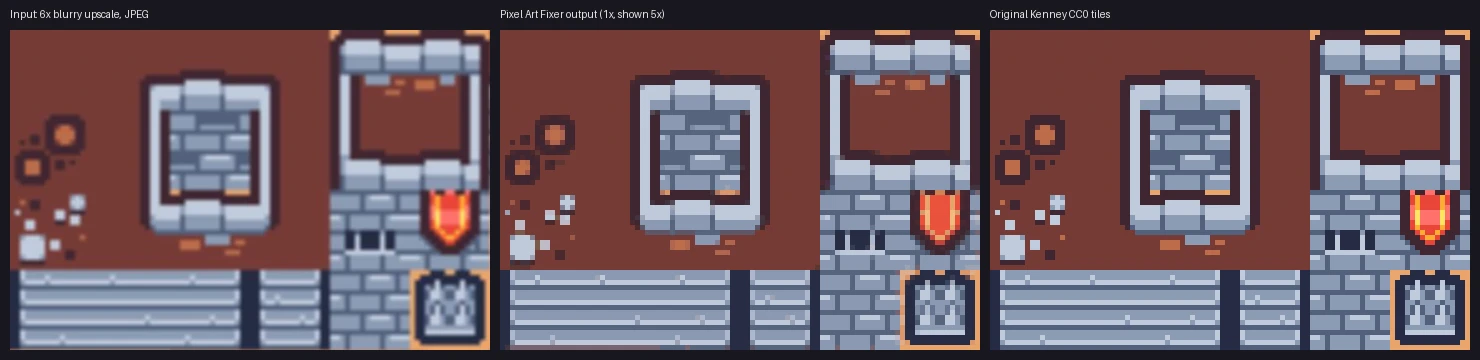
- Retro Diffusion Pixel Art Fixer (Standard engine, free, no signup): to fake a bad AI pixel image, we blew the packed tilemap up 6x with smooth scaling and saved it as a JPEG at quality 70 (1152x1056, 117,124 bytes). The fixer detected a 6x6 pixel grid in 3.7 seconds and gave back a 192x176 PNG (22,744 bytes), the exact original size, with a 47 color auto palette. 90.5% of pixels were within 16 levels per channel of the original, but only 17.1% matched exactly, because JPEG shifted the colors. The tiles look right; the palette needs a cleanup pass if you want the original 28 colors.
- Godot 4.7.2: both the Kenney tilemap and the fixer output loaded at runtime as 192x176 RGBA8 images and textures.
extends SceneTree
func _init():
	for f in ["res://px/tilemap_packed.png", "res://px/fixed_1x.png"]:
		var img = Image.load_from_file(f)
		print(f, " ", img.get_width(), "x", img.get_height())   # 192x176 for both
		var tex = ImageTexture.create_from_image(img)
	quit()
In a normal project you do not need code: drag the PNG into the FileSystem dock and set the texture filter to Nearest so the pixels stay sharp. The script above is just how we checked the files headless.
How to get pixel art you can sell, for free
- Fill the basics with CC0 tiles from Kenney: floors, walls, doors and props. They cost you no generations and need no license tracking.
- Pick one AI tool whose free plan allows commercial use: PixelLab, Retro Diffusion or SpriteCook. Do not ship Spritefy Free art in a game you sell.
- Spend the free allowance on hero art, like your main character and a few key items. For animation frames, our sprite sheet guide shows how to pack them.
- Clean the grid for free. If a result looks soft or off grid, run it through the Retro Diffusion Pixel Art Fixer and download the 1x PNG.
- Keep a license note for every file: tool, plan, date and license, plus a screenshot of the pricing page. More on selling in Can I sell a game made with AI art?
What we did not test
- Generating a sprite with PixelLab, Retro Diffusion, SpriteCook or Spritefy. Each needs an account, and we did not sign up or pay. Their limits above come from official pages on November 16, 2026.
- Which free starting amount Retro Diffusion gives today. Its pricing page and home page say different things.
- PixelLab's free download formats, and whether free PixelLab images are shown publicly. Its pricing page and FAQ do not say.
- The Pixel Art Fixer's Neural engine. Its FAQ says Neural images are sent to its server and not retained; we only used the Standard engine, which runs in the browser.
Tools in this guide
PixelLab
Generates pixel art sprites, characters and animations for 2D games.
Pricing: Freemium, from $12/mo. Beginner rating: 5/5. Built specifically for pixel art game assets.
Free trial with commercial use: 40 fast generations, then 5 a day, up to 200x200. Paid from $12 a month.
Retro Diffusion
Creates retro style pixel art images and tiles from prompts.
Pricing: Paid, from $5 (top-up). Beginner rating: 5/5. Focused tool with clean pixel output and $0.50 of free balance for new accounts, no card needed.
Pay per image from $0.03, free starting balance, and a free no-signup Pixel Art Fixer we tested.
SpriteCook
Generates and animates 2D game art from text prompts, in pixel art or detailed HD style: characters, items, tilesets, seamless textures, UI kits and sprite sheets. Works in the browser, by API, or from coding agents through its MCP server.
Pricing: Freemium, from $12/mo. Beginner rating: 5/5. Simple prompt-to-sprite web app with a free plan, plus an MCP server if you already build with Claude Code, Codex or Cursor.
40 free credits every 30 days with commercial use and no credit needed. Free generations are public.
Spritefy
Generates pixel art and 2D game assets from a text prompt, including characters, items, tiles and effects. Paid plans add animation, rigged 3D models, sound effects and music.
Pricing: Freemium, from €19/mo. Beginner rating: 5/5. Works in the browser with 80 one-time starter credits and no card, plus 14 free image tools. Animation, audio and commercial use need a paid plan.
80 one-time free credits, but Free outputs are non-commercial and public. Commercial use from 19 euros a month.
Kenney
Thousands of free 2D and 3D game assets, UI and audio packs. Kenney states all assets on its asset pages are public domain (CC0), commercial use allowed, attribution not required.
Pricing: Free. Beginner rating: 5/5. Consistent style, no sign up, and the CC0 license means nothing to track.
CC0 pixel packs, free with no account. Our Tiny Dungeon zip: 132 tiles, credit optional.
FAQ
Which free AI pixel art generators allow commercial use?
Three of the four we checked on November 16, 2026 allow commercial use of what you make on the free allowance: PixelLab (free trial, its Terms say you own your creations for commercial use), Retro Diffusion (free starting balance, its Terms say you own your outputs) and SpriteCook (Free plan, commercial use on every plan with no credit needed). Spritefy's Free plan is personal, non-commercial use only. The free allowances are small, and Retro Diffusion and SpriteCook free outputs can be shown publicly.
Is PixelLab free for commercial use?
Yes, according to its own pages. PixelLab's pricing table (checked November 16, 2026) lists Use generated images commercially on the free trial, and its Terms of Service (last updated October 30, 2026) say you own the copyrights to your creations for commercial and non-commercial use. The one limit is that you may not use the images to train other AI models. The free trial gives 40 fast generations, then 5 slower generations a day (store up to 20), at up to 200x200 pixels, with no credit card.
Is Retro Diffusion free?
New accounts start with free balance and no card. On November 16, 2026 the pricing page said $0.50 of balance, enough for 16 RD Fast or 2 RD Pro images, while the home page FAQ said free daily usage of about 3 RD Pro images to start and more every day. After that you pay per image (RD Fast $0.03, RD Core $0.10, RD Pro $0.18) by topping up from $5, and the balance never expires. Its Pixel Art Fixer and 10 other browser tools are free with no signup.
Can I sell a game with SpriteCook free sprites?
Yes. SpriteCook's pricing page (checked November 16, 2026) lists commercial use on every plan including Free and says you do not need to credit SpriteCook. Free generations appear in its public gallery, and its Terms (effective November 12, 2026) say the terms of the AI providers behind its models also apply. Free gives 40 credits every 30 days; an image costs 8 to 12 credits.
Can I use Spritefy free sprites in a commercial game?
No. Spritefy's pricing page and Terms (last updated November 9, 2026) say Free outputs are for personal, non-commercial use and are public by default. Commercial use starts on Starter at 19 euros a month, and buying a credit pack on Free does not change the licence of Free outputs.
Do I need to credit Kenney pixel art?
No. Kenney's support page and the License.txt in the Tiny Dungeon zip say the assets are CC0, free for commercial projects, and crediting Kenney is not mandatory.
Do I have to disclose AI pixel art on Steam?
If AI-generated art ships in your game, answer the AI section of Steam's Content Survey honestly. PixelLab's FAQ says you are allowed to use its AI assets in your games. Our guide Can I sell a game made with AI art? covers Steam and itch.io.
Related
Choosing a tool? Read Best AI tools for pixel art, PixelLab vs Retro Diffusion and Best free AI tools for 2D game art. Animating? Read How to make a sprite sheet with AI for free. Need sounds too? See which free AI sound effect generators allow commercial use. Browse every 2D art and sprites tool.
Sources, checked November 16, 2026: PixelLab pricing table, PixelLab FAQ and PixelLab Terms of Service; Retro Diffusion home page and FAQ, Retro Diffusion pricing, Retro Diffusion Terms and Retro Diffusion Pixel Art Fixer; SpriteCook pricing and SpriteCook Terms; Spritefy pricing and Spritefy Terms; Kenney support and Kenney Tiny Dungeon. File tests on November 16, 2026 with Pillow and Godot 4.7.2.
