How to import an AI 3D model into three.js
Short answer: download a .glb, put it in public/models/, and load it with three.js's GLTFLoader. Then fix the scale (glTF uses meters) and shrink the file before you put it on the web, because raw AI exports are huge. The free glTF Transform CLI cut our 11.8 MB TRELLIS.2 chest to 836 KB, and three.js loaded it after one extra line, setMeshoptDecoder. Everything here is free. We tested it in three.js r187 on November 10, 2026 with the same CC0 chest we generated on November 7.
What you need
- A GLB file. No model yet? Start with Which free AI 3D model generators let you download? or Best free AI 3D model generators for game assets. We reused the three files from Hunyuan3D vs TRELLIS.2 for free 3D game assets: a TRELLIS.2 textured chest (11,817,020 bytes), a Hunyuan3D 2.1 untextured chest (7,601,444 bytes) and Hunyuan3D's Simplify Mesh 10,000 export (180,620 bytes).
- A three.js project. If you do not have one, How to make a browser game with three.js and AI sets up Vite and three.js and has an AI coding agent write the game. We used npm
three0.187.0 (revision r187), the latest on npm on November 10, 2026. - glTF Transform, to shrink the file. Free and MIT licensed. We used
@gltf-transform/cli4.5.1 from npm.
Step 1: put the GLB where your build can see it
In a Vite project, copy the file to public/models/. Vite copies public/ into the build unchanged, so the file is served at /models/your_file.glb. Keep the .glb (binary) form when your generator offers it: the glTF 2.0 specification lets a GLB carry the JSON, mesh data and textures in one file, so there are no separate texture files to lose.
Step 2: load it with GLTFLoader
The three.js GLTFLoader docs (checked November 10, 2026) say the loader is an addon you import from three/addons/loaders/GLTFLoader.js, and that setMeshoptDecoder is required for files that use EXT_meshopt_compression. This is the loading code we ran:
import * as THREE from 'three';
import { GLTFLoader } from 'three/addons/loaders/GLTFLoader.js';
import { MeshoptDecoder } from 'three/addons/libs/meshopt_decoder.module.js';

const loader = new GLTFLoader();
// Only needed for files compressed with meshopt (Step 5). Harmless otherwise.
loader.setMeshoptDecoder(MeshoptDecoder);

loader.load('/models/trellis_chest.glb', (gltf) => {
  const model = gltf.scene;
  scene.add(model);
}, undefined, (err) => console.error(err));
Here is what three.js r187 gave us for each raw file, read from the loaded scene and the renderer:
| File, loaded November 10, 2026 | Triangles | Size in three.js units | Material | Draw calls |
|---|---|---|---|---|
| TRELLIS.2 textured chest, 11.8 MB | 297,020 | 0.98 by 0.65 by 0.55 | MeshStandardMaterial, 2048 by 2048 color map (sRGB) plus metalness and roughness maps | 1 |
| Hunyuan3D 2.1 untextured, 7.6 MB | 422,248 | 1.99 by 1.31 by 1.19 | MeshStandardMaterial, no textures (renders plain white) | 1 |
| Hunyuan3D Simplify Mesh 10,000, 181 KB | 10,000 | 1.99 by 1.31 by 1.19 | MeshStandardMaterial, no textures | 1 |
Each file arrived as a Group with one Mesh inside (the two full size files also had an Object3D named world between them). The TRELLIS.2 file stores its textures as WebP using the EXT_texture_webp extension, which the GLTFLoader docs list as supported, and they loaded with no extra code. There was no normal map. If your download came out untextured like our Hunyuan3D files, finish it with How to texture a 3D model for free with AI.
A light matters: MeshStandardMaterial is a lit PBR material, so add at least a HemisphereLight or DirectionalLight or the model will look black. We used one of each.
Step 3: fix the scale
The glTF 2.0 specification (checked November 10, 2026) says the units for all linear distances are meters and that +Y is up, which matches three.js's default Y up camera. So treat 1 three.js unit as 1 meter for GLBs. AI generators still pick their own size: from the same chest picture, TRELLIS.2 gave us a chest about 1 meter wide and Hunyuan3D one about 2 meters wide. Measure with Box3 and rescale:
// glTF units are meters. Make the chest exactly 1 meter wide,
// centered on x and z, sitting on the ground (y = 0).
const size = new THREE.Box3().setFromObject(model).getSize(new THREE.Vector3());
model.scale.setScalar(1 / size.x);
model.updateMatrixWorld(true);
const box = new THREE.Box3().setFromObject(model);
const center = box.getCenter(new THREE.Vector3());
model.position.x -= center.x;
model.position.z -= center.z;
model.position.y -= box.min.y;
We ran that on the 10,000 triangle Hunyuan3D chest. Afterward it measured 1 by 0.659 by 0.599 units, with its bottom at y = 0 and centered on x and z. If you have many models to normalize, fix scale and origin once in Blender and re-export, as in How to turn an image into a 3D game model for free.
Step 4: shrink the file before you ship it
An 11.8 MB prop is a slow first load for a browser game, and 297,020 triangles is a lot for one chest. glTF Transform's CLI (docs checked November 10, 2026) has an optimize command that runs the common fixes in one step. Its docs also warn the defaults may not suit every scene and suggest running gltf-transform inspect first. These are the two runs we did:
npm install --global @gltf-transform/cli

# Defaults: weld, light simplify, meshopt compression, textures kept at 2048
gltf-transform optimize trellis_chest.glb trellis_opt_default.glb

# Lighter web prop: keep about 10% of vertices, 1024 textures as WebP
gltf-transform optimize trellis_chest.glb trellis_opt_web.glb \
  --simplify-ratio 0.1 --simplify-error 0.01 \
--texture-size 1024 --texture-compress webp| TRELLIS.2 chest, November 10, 2026 | File size | Triangles | Textures | glTF validation |
|---|---|---|---|---|
| Raw download | 11,817,020 bytes | 297,020 | 2048 WebP | 1 error: a zero length normal |
optimize defaults | 2,903,140 bytes | 207,636 | 2048 WebP | No errors |
optimize lighter web prop | 835,588 bytes | 36,160 | 1024 WebP | No errors |
The validation column comes from gltf-transform validate. The raw TRELLIS.2 file had one ACCESSOR_VECTOR3_NON_UNIT error (one normal of length 0). three.js loaded and rendered it anyway, and both optimized files validated with no errors or warnings. The optimized files keep the same size in meters (0.98 by 0.65 by 0.55).
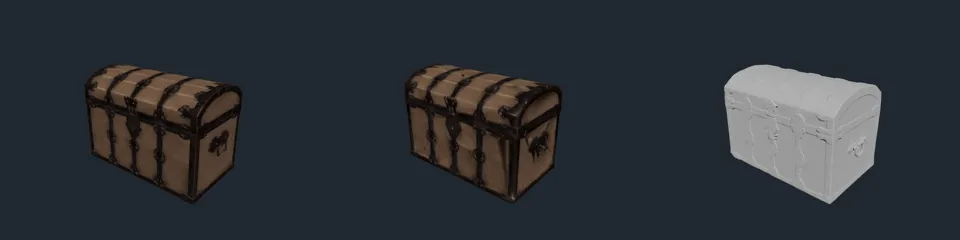
At this camera distance the 836 KB chest looks close to the raw one; up close you will see softer texture detail from the 1024 maps. Try a few --simplify-ratio values and look at the result in your own game camera before you pick one. On this textured chest, simplify would not go below about 36,000 triangles; for a deeper cut, see How to reduce polygons of an AI 3D model for free, where Blender Decimate reached 10,098.
Step 5: register the meshopt decoder
This is the step that trips people up. optimize compresses geometry with meshopt by default, and adds the EXT_meshopt_compression and KHR_mesh_quantization extensions to the file. When we loaded the optimized chest without a decoder, three.js r187 refused with:
THREE.GLTFLoader: setMeshoptDecoder must be called before loading compressed filesAdding loader.setMeshoptDecoder(MeshoptDecoder) (the import is in the Step 2 code) fixed it, and both optimized files loaded and rendered. If you compress with Draco instead (--compress draco), the GLTFLoader docs say you need a DRACOLoader passed to setDRACOLoader. We did not test Draco.
What our test showed
- three.js r187 (npm
three0.187.0) loaded all three raw November 7 chest GLBs with plainGLTFLoader, one draw call each, triangle counts matching the files: 297,020, 422,248 and 10,000. - TRELLIS.2's WebP PBR textures came through as a 2048 color map plus metalness and roughness maps on a
MeshStandardMaterial. The Hunyuan3D files loaded untextured. - Sizes in three.js units matched the sizes Godot 4.7.2 reported for the same files on November 8: about 1 meter wide for TRELLIS.2 and 2 meters for Hunyuan3D.
- glTF Transform 4.5.1
optimizeshrank the TRELLIS.2 chest from 11.8 MB to 2.9 MB (defaults) or 836 KB (lighter settings), and the outputs passedgltf-transform validate. - Optimized files need
setMeshoptDecoder; without it three.js threw the error above.
Troubleshooting
- The model is black. Add a light.
MeshStandardMaterialneeds one. - "setMeshoptDecoder must be called". Import
MeshoptDecoderfromthree/addons/libs/meshopt_decoder.module.jsand callloader.setMeshoptDecoder(MeshoptDecoder)beforeload. - The model is huge, tiny or floating. Measure it with
Box3and use the Step 3 code. Our two chests were 1 meter and 2 meters wide from the same picture. - 404 on the model. In Vite, files in
public/models/load from/models/..., not/public/models/.... - The page takes ages to load. Check the file size and triangle count with
gltf-transform inspect, then runoptimize. - Mixed three.js versions. Import the loader and decoder from the same
threepackage as the core, as the browser game guide explains.
What we did not test
- GLB files from Meshy, Tripo or Rodin. They export GLB on the free plans we checked, but today we loaded only the November 7 TRELLIS.2 and Hunyuan3D chests.
- Draco or KTX2 compression, animated or rigged GLBs, and collision or physics. three.js has no built in physics; that needs a separate library, which we did not test here.
- Real download speed on a phone or on itch.io. We measured file sizes and loaded the files from a local server in headless Chrome 156, not over a real network.
- Unity or Unreal imports.
Free tools in this guide
TRELLIS.2
Microsoft's open source image to 3D model (MIT license). Turns one picture into a textured 3D asset with PBR materials and exports GLB. Free online demo on Hugging Face.
Pricing: Free. Beginner rating: 4/5. Free and fine for commercial use, but running it yourself needs Python and a 24 GB NVIDIA GPU. Try the free online demo first.
The textured chest we loaded: 297,020 triangles and 2048 WebP PBR maps, MIT licensed.
Hunyuan3D 2.1
Tencent's open-weight image to 3D model with PBR texture generation. Free online demo on Hugging Face, exports GLB or OBJ. Its license does not apply in the EU, UK or South Korea.
Pricing: Free. Beginner rating: 4/5. Free demo and free weights, but running it yourself needs Python and 10 to 29 GB of GPU memory, and the license excludes some countries.
The untextured chest we loaded, plus the 10,000 face simplified export. Check the license territory first.
Blender
Free, open source 3D app for modeling, UV unwrapping, texturing, baking, rigging and animation. It imports and exports glTF/GLB, FBX and OBJ, so it is the free workbench for fixing and texturing AI-generated models before they go into Godot, Unity or Unreal.
Pricing: Free. Beginner rating: 4/5. Free with no account, and it does almost everything, but the interface is big and a beginner needs a tutorial for UVs, materials and baking.
Free app for fixing scale and origin, or decimating by hand when you want more control than glTF Transform.
Related
Need a file first? Read Which free AI 3D model generators let you download? and Best free AI 3D model generators for game assets, or see how we made these chests in Hunyuan3D vs TRELLIS.2 for free 3D game assets. Building the game around it? Start with How to make a browser game with three.js and AI or How to make a cozy walking game in three.js with AI. Using Godot instead? Follow How to import an AI 3D model into Godot. Characters need a skeleton next: How to rig an AI-generated 3D model for free. Browse every 3D model and texture tool.
FAQ
Can three.js load a GLB from an AI 3D generator?
Yes. three.js loads glTF 2.0 (.gltf and .glb) with GLTFLoader, an addon that ships in the three package. On November 10, 2026 we loaded three GLBs from the same CC0 chest we generated on November 7 in three.js r187 (npm three 0.187.0) in headless Chrome: a TRELLIS.2 textured file, a Hunyuan3D 2.1 untextured file and Hunyuan3D's 10,000 face simplified export. All three loaded and rendered with no code beyond GLTFLoader.
Do I need extra code for the WebP textures from TRELLIS.2?
No. The TRELLIS.2 GLB uses the EXT_texture_webp extension, which the GLTFLoader docs list as supported. In our test the chest came in as a MeshStandardMaterial with a 2048 by 2048 color map in sRGB plus metalness and roughness maps, with no extra setup.
Why is my AI model so big to download?
Raw AI exports are heavy. Our TRELLIS.2 chest is 11,817,020 bytes (11.8 MB) with 297,020 triangles, which is a lot for one prop on a web page. glTF Transform's optimize command (free, MIT) cut it to 2,903,140 bytes with default settings, and to 835,588 bytes (836 KB) with 36,160 triangles and 1024 textures when we asked for a lighter mesh. Both optimized files loaded and rendered in three.js r187.
Why does three.js say setMeshoptDecoder must be called?
Your file was compressed with meshopt (glTF Transform's optimize command does this by default). Our optimized file failed to load with the exact error 'THREE.GLTFLoader: setMeshoptDecoder must be called before loading compressed files'. Import MeshoptDecoder from three/addons/libs/meshopt_decoder.module.js and call loader.setMeshoptDecoder(MeshoptDecoder) before load. After that the same file loaded fine.
What scale does three.js use for a GLB?
three.js itself does not force a unit, but the glTF 2.0 specification says all linear distances in a glTF file are meters, so treat 1 three.js unit as 1 meter when you load GLBs. Our TRELLIS.2 chest measured 0.98 by 0.65 by 0.55 and the Hunyuan3D chest 1.99 by 1.31 by 1.19 from the same picture. Measure with Box3 and call model.scale.setScalar() to fix it. Scaling the Hunyuan3D chest by 1 divided by its width gave exactly 1 meter wide.
Did you test Meshy, Tripo, Unity or Unreal?
No. We loaded the November 7 TRELLIS.2 and Hunyuan3D chests only. Meshy, Tripo and Rodin also export GLB on the free plans we checked, but we did not load one of their files today. For Godot, see our tested Godot import guide. We did not test Unity or Unreal.
Sources, checked November 10, 2026: three.js GLTFLoader docs (addon import path, supported extensions including EXT_texture_webp and EXT_meshopt_compression, setMeshoptDecoder and setDRACOLoader), glTF 2.0 specification (meters, +Y up, GLB container) and glTF Transform CLI docs (optimize, inspect, validate). Versions from npm: three 0.187.0, @gltf-transform/cli 4.5.1, both MIT. Generation facts and licenses for the test files are from our November 7 Hunyuan3D vs TRELLIS.2 guide. Test image: Treasure Chest by Rico Cilliers, CC0, Poly Haven. Tested in three.js r187 in headless Chrome 156.
