How to reduce polygons of an AI 3D model for free
Short answer: open the GLB in free Blender, add a Decimate modifier in Collapse mode, lower the Ratio until the face count fits your engine, apply it and export a GLB. On November 12, 2026 that took our 11.8 MB TRELLIS.2 chest from 297,020 to 10,098 triangles (1.76 MB, or 853 KB with 1024 textures) with the texture still in place. Do not run Merge by Distance first on a textured model: in our test it scrambled the texture. The free glTF Transform CLI is a one command alternative, but it stopped near 36,000 triangles on this chest.
Some links are affiliate links. If you buy, StarterLoot may earn a commission at no extra cost to you. It never changes our ratings. Read the full disclosure.
What you need
- A heavy GLB. Raw AI downloads are dense. We reused the CC0 chest from Hunyuan3D vs TRELLIS.2 for free 3D game assets: the TRELLIS.2 file is 11,817,020 bytes with 297,020 triangles, 219,880 vertices and two 2048 by 2048 WebP textures (color, plus metalness and roughness). No model yet? Read Which free AI 3D model generators let you download?
- Blender, free and open source. We used Blender 5.2.3 LTS for Linux from blender.org, run headless.
- glTF Transform CLI (optional), free and MIT licensed. We used
@gltf-transform/cli4.5.1 from npm.
Step 1: check how heavy the model is
Before you cut anything, read the numbers. gltf-transform inspect prints triangles (the glPrimitives column), vertices and every texture with its resolution and size:
npm install --global @gltf-transform/cli
gltf-transform inspect trellis_chest.glb
In Blender, turn on Overlays > Statistics to see the same counts in the viewport. For our chest, the mesh data alone was about 10.6 MB and the two textures about 1.2 MB. So the polygons are most of this file, and cutting them is the big win.
Step 2: pick a triangle budget
Use your engine's official limit when it has one, and otherwise pick a number and check it on screen:
- Roblox: the Roblox mesh specifications (checked November 12, 2026) say individual meshes can not exceed 20,000 triangles. Roblox Studio imports
.gltfand.glbfiles, per the same docs. A raw AI chest at 297,020 triangles is far over. - Godot: the Godot mesh LOD docs (checked November 12, 2026) say Godot generates lower detail LOD meshes automatically for imported glTF scenes and uses them when the camera is far away. That helps the frame rate, but the file size and any trimesh collision still use the full mesh. Our Godot import guide found the raw chest gave a collision shape with 891,060 face vertices.
- three.js and Unity: we did not find an official per mesh triangle limit. For a small prop, we aim for 10,000 to 20,000 triangles and then look at it in the game camera.
Step 3: decimate in Blender (best for a big cut)
The Blender manual's Decimate modifier page (checked November 12, 2026) says Collapse mode merges vertices progressively while taking the shape into account, that Ratio is the share of faces to keep (0.5 keeps half), and that the modifier shows the remaining face count. By hand:
- File > New > General, delete the default cube, then File > Import > glTF 2.0 and pick your GLB.
- Click the model, open the wrench tab (Modifiers), and choose Add Modifier > Generate > Decimate.
- Leave it on Collapse and lower Ratio. Watch the face count on the modifier. For a 10,000 triangle target on a 297,020 triangle model, start at 0.034.
- Look at the model up close. If the silhouette or texture breaks, raise the ratio.
- Open the modifier's dropdown and pick Apply, then File > Export > glTF 2.0 with Format set to glTF Binary (.glb).
Or run it headless with this short script. It is what we ran on November 12, 2026:
# decimate_glb.py: blender -b --python decimate_glb.py -- in.glb out.glb 0.034
import bpy, sys
src, out, ratio = sys.argv[sys.argv.index("--") + 1:][:3]
bpy.ops.wm.read_factory_settings(use_empty=True)
bpy.ops.import_scene.gltf(filepath=src)
for obj in [o for o in bpy.context.scene.objects if o.type == "MESH"]:
    # No Merge by Distance here: on a textured AI model it scrambled the UVs
    mod = obj.modifiers.new("Decimate", "DECIMATE")
    mod.decimate_type = "COLLAPSE"
    mod.ratio = float(ratio)
bpy.ops.export_scene.gltf(filepath=out, export_format="GLB", export_apply=True)
blender -b --python decimate_glb.py -- trellis_chest.glb chest_10k.glb 0.034Each run took 7 to 8 seconds on our Linux box. Blender kept the WebP textures in the GLB at 2048 by 2048. Results:
| Blender 5.2.3 Decimate, November 12, 2026 | Triangles | File size | How it looked |
|---|---|---|---|
| Raw TRELLIS.2 chest | 297,020 | 11,817,020 bytes | Reference |
| Ratio 0.5 | 148,507 | 7,759,704 bytes | Same as raw |
| Ratio 0.1 | 29,701 | 2,680,908 bytes | Very close to raw |
| Ratio 0.06 | 17,820 | 2,135,792 bytes | Close to raw, slightly softer strap edges |
| Ratio 0.034 | 10,098 | 1,759,608 bytes | Good from a game camera, wavier metal straps up close |
| Ratio 0.01 | 2,969 | 1,432,984 bytes | Broken: torn texture and lumpy wood |
| Merge by Distance (0.0001 m), then ratio 0.034 | 16,374 | 2,130,796 bytes | Broken: texture scrambled |
Every unmerged output passed gltf-transform validate with no errors, and Godot 4.7.2 loaded the 10,098 and 17,820 triangle files with their 2048 color textures.
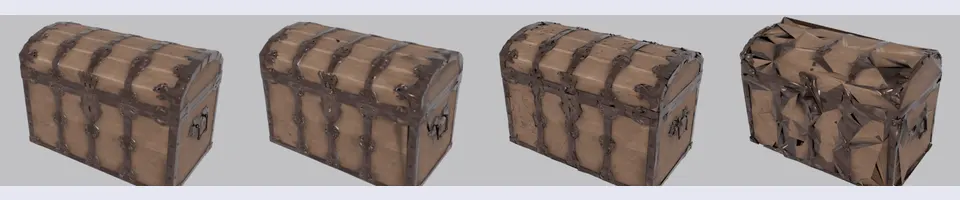
The trap: Merge by Distance on a textured model
A lot of cleanup advice, including the script in our own image to 3D guide, merges duplicate vertices before decimating. On an untextured mesh that is fine. On the textured TRELLIS.2 chest it was not: merging joined vertices that sit on the same spot but on different parts of the texture (UV seams), and Decimate then pulled the texture across the seams. With the merge step, our image to 3D cleanup script at a 10,000 target gave 16,090 triangles and a smeared chest. With that one line commented out, the same script gave 9,996 triangles and the texture stayed in place. If your AI model came with a texture, skip Merge by Distance.
Step 4 (alternative): weld and simplify with glTF Transform
glTF Transform's CLI (docs checked November 12, 2026) can do this in the terminal, no Blender needed. Its simplify help says the tool aims for the target ratio of vertices while keeping error under a limit, that split vertices limit it, and that you should run weld first. We ran:
# Join duplicate vertices first, as the simplify docs suggest
gltf-transform weld trellis_chest.glb welded.glb

# Aim for 10% of the vertices, allow up to 1% error (of the mesh radius)
gltf-transform simplify welded.glb chest_simplified.glb --ratio 0.1 --error 0.01

# Optional: 1024 textures instead of 2048
gltf-transform resize chest_simplified.glb chest_1024.glb --width 1024 --height 1024| glTF Transform 4.5.1, weld then simplify | Triangles | File size |
|---|---|---|
| Ratio 0.5, error 0.01 | 148,503 | 7,519,424 bytes |
| Ratio 0.25, error 0.01 | 74,254 | 4,932,308 bytes |
| Ratio 0.1, error 0.001 | 70,656 | 4,796,684 bytes |
| Ratio 0.1, error 0.01 | 36,160 | 3,077,164 bytes |
| Ratio 0.05, error 0.01 | 36,176 | 3,077,676 bytes |
| Ratio 0.02, error 1 (no error limit) | 35,888 | 3,066,252 bytes |
| Ratio 0.1, error 0.01, then 1024 textures | 36,160 | 2,170,908 bytes |
The result at 36,160 triangles looks almost the same as the raw chest (second picture above), validated with no errors and loaded in Godot 4.7.2 with its texture. But it would not go lower. Even with the error limit removed, every run stopped near 36,000 triangles, which is still over Roblox's 20,000 limit. weld barely changed the vertex count (219,880 to 219,838), so the seams that block the simplifier stayed. Skipping weld gave 36,220 triangles at ratio 0.1. For a cut this deep on a textured model, use Blender.
Building for the web? gltf-transform optimize also compresses the mesh. Our three.js import guide got this chest to 2,903,140 bytes with defaults and 835,588 bytes with lighter settings, but those files need setMeshoptDecoder in three.js. Plain simplify and resize do not add mesh compression.
Step 5: shrink the textures too
After decimating, textures can be most of the file. Our 10,098 triangle chest was 1,759,608 bytes, and resizing its two textures from 2048 to 1024 with gltf-transform resize cut it to 853,316 bytes. The 17,820 triangle version went to 1,229,508 bytes.
TRELLIS.2 stores its textures as WebP, and the GLB lists EXT_texture_webp as required. Roblox's 3D Importer docs list PNG, JPG, GIF, TGA and BMP for images. We did not test a Roblox import, so if Studio rejects the textures, convert them: gltf-transform png in.glb out.glb --formats "*" worked for us, but PNG is much bigger (our 10,098 triangle chest grew to 3,498,760 bytes at 1024 and 11,101,072 bytes at 2048).
Step 6: check it in your engine
Look at the reduced model from your real game camera, not only up close in Blender. Then load it in your engine: How to import an AI 3D model into Godot or How to import an AI 3D model into three.js. Building on Roblox? Start with How to make a Roblox game with AI.
Shortcut: simplify inside Hunyuan3D
If you generate with Hunyuan3D 2.1, its free demo's export tab has a Simplify Mesh option. In our November 7 test it cut the chest from 422,248 to exactly 10,000 faces, a 180,620 byte GLB, but that file was untextured. TRELLIS.2's demo would not decimate below 100,000 faces, which is why we used Blender and glTF Transform here.
What our test showed
- Blender 5.2.3 Decimate (Collapse) took the TRELLIS.2 chest from 297,020 to 10,098 triangles and 11.8 MB to 1.76 MB with the texture intact. 2,969 triangles was too far.
- Merge by Distance before Decimate scrambled the texture and overshot the target (16,374 triangles instead of about 10,000).
- glTF Transform 4.5.1 weld and simplify looked great at 36,160 triangles but could not go below about 36,000 on this textured chest.
- Resizing textures to 1024 halved the decimated file again (853,316 bytes at 10,098 triangles).
- Every Decimate modifier and weld plus simplify output passed
gltf-transform validatewith no errors, and Godot 4.7.2 loaded the 36,160, 17,820 and 10,098 triangle files with textures.
Troubleshooting
- The texture is smeared or shredded. Undo Merge by Distance, or raise the Decimate ratio. Both caused it in our test.
- Simplify will not go lower. Your model has UV seams the simplifier will not cross. Use Blender Decimate.
- The file is still big after decimating. Check the textures with
gltf-transform inspectand resize them to 1024. - three.js says setMeshoptDecoder must be called. You used
optimize, which compresses the mesh. See the three.js import guide. - Edges look wavy or lumpy. Raise the ratio a little. In our test 0.06 (17,820 triangles) kept the metal straps cleaner than 0.034 (10,098).
What we did not test
- GLB files from Meshy (site, affiliate link), Tripo or Rodin. We tested only the November 7 TRELLIS.2 chest, plus the documented Hunyuan3D export.
- Rigged or animated characters. To be safe, reduce the mesh first and rig it afterward, as in How to rig an AI-generated 3D model for free.
- Importing the reduced files into Roblox Studio, Unity or Unreal, and normal map baking from the high poly mesh.
Free tools in this guide
Blender
Free, open source 3D app for modeling, UV unwrapping, texturing, baking, rigging and animation. It imports and exports glTF/GLB, FBX and OBJ, so it is the free workbench for fixing and texturing AI-generated models before they go into Godot, Unity or Unreal.
Pricing: Free. Beginner rating: 4/5. Free with no account, and it does almost everything, but the interface is big and a beginner needs a tutorial for UVs, materials and baking.
Decimate modifier took our chest to 10,098 triangles with the texture intact. Version 5.2.3 LTS.
TRELLIS.2
Microsoft's open source image to 3D model (MIT license). Turns one picture into a textured 3D asset with PBR materials and exports GLB. Free online demo on Hugging Face.
Pricing: Free. Beginner rating: 4/5. Free and fine for commercial use, but running it yourself needs Python and a 24 GB NVIDIA GPU. Try the free online demo first.
Made the 297,020 triangle textured chest we reduced. MIT licensed.
Hunyuan3D 2.1
Tencent's open-weight image to 3D model with PBR texture generation. Free online demo on Hugging Face, exports GLB or OBJ. Its license does not apply in the EU, UK or South Korea.
Pricing: Free. Beginner rating: 4/5. Free demo and free weights, but running it yourself needs Python and 10 to 29 GB of GPU memory, and the license excludes some countries.
Its demo's Simplify Mesh export gives a 10,000 face file directly, untextured. Check the license territory first.
Related
Need a file first? Read Which free AI 3D model generators let you download? and Best free AI 3D model generators for game assets. Starting from a picture? See How to turn an image into a 3D game model for free. Untextured result? How to texture a 3D model for free with AI. Want a true low poly look instead? How to make low poly 3D game props with AI for free compares a free CC0 kit chest at 2,546 triangles with this AI chest. Browse every 3D model and texture tool.
FAQ
What is the easiest free way to reduce polygons on an AI model?
Blender's Decimate modifier in Collapse mode. Import the GLB, add Decimate, lower the Ratio until the face count fits your budget, apply it and export a GLB. On November 12, 2026, in Blender 5.2.3 LTS, a ratio of 0.034 took our TRELLIS.2 chest from 297,020 to 10,098 triangles and from 11,817,020 to 1,759,608 bytes, with the texture still mapped. If you prefer one terminal command, glTF Transform's weld and simplify also work, but on this textured chest they could not go below about 36,000 triangles.
Why did my texture turn into a mess after decimating?
In our test, running Mesh > Clean Up > Merge by Distance before Decimate scrambled the TRELLIS.2 chest's texture. The same ratio then gave 16,374 triangles instead of about 10,000, and the wood and metal were smeared across big triangles. Without the merge step the texture stayed in place. On a textured AI download, skip Merge by Distance and decimate the mesh as it came.
Why does gltf-transform simplify stop at a higher triangle count than I asked for?
Its docs say the simplifier quits early if the error limit would be exceeded, and that topology, particularly split vertices, also limits it. Our chest has many UV seams, and weld did not join them (219,880 vertices before, 219,838 after). Ratios of 0.1, 0.05 and even 0.02 with the error limit removed all ended near 36,000 triangles. Use Blender Decimate when you need fewer triangles than that on a textured model.
How many triangles can a Roblox mesh have?
Roblox's mesh specifications page (checked November 12, 2026) says individual meshes can not exceed 20,000 triangles. Our 10,098 and 17,820 triangle Blender exports are under that. The 36,160 triangle glTF Transform file and the raw 297,020 triangle chest are not. We did not import these files into Roblox Studio.
Do I need to reduce polygons for Godot?
Godot's docs (checked November 12, 2026) say it generates lower detail LOD meshes automatically when it imports glTF scenes, using the meshoptimizer library, and uses them when the camera is far away. That helps rendering, but the file you ship and any trimesh collision still use the full mesh, so a 297,020 triangle prop is still heavy. Godot 4.7.2 loaded our 36,160, 17,820 and 10,098 triangle files with their 2048 textures.
Does reducing polygons make the file small enough for the web?
Only partly. At 10,098 triangles our chest was still 1,759,608 bytes, mostly because of two 2048 by 2048 WebP textures. Resizing them to 1024 brought it to 853,316 bytes. For three.js, glTF Transform's optimize command also compresses the mesh; our three.js guide got the same chest to 835,588 bytes that way, but those files need a meshopt decoder.
Sources, checked November 12, 2026: Blender manual, Decimate modifier (Collapse, Ratio, face count), glTF Transform CLI docs and simplify docs (ratio, error, weld first, split vertices), Roblox mesh specifications (20,000 triangles per mesh, glTF import), Roblox 3D Importer docs (image formats) and Godot mesh LOD docs (automatic LOD on glTF import). Versions: Blender 5.2.3 LTS, @gltf-transform/cli 4.5.1, Godot 4.7.2. Hunyuan3D numbers and test file licenses are from our November 7 Hunyuan3D vs TRELLIS.2 guide. Test image: Treasure Chest by Rico Cilliers, CC0, Poly Haven.
