Which free AI auto-rigging tools let you export?
Short answer: four free options let you export a rigged character you can put in a game you sell: Mesh2Motion (GLB or FBX, in your browser, no account), Mixamo (free with an Adobe ID, humanoids only), AccuRIG (FBX or USD, Windows only) and Blender with Rigify or automatic weights (GLB or FBX), which is also what MCP for Blender drives. Cascadeur Free rigs but only saves .casc files and is non-commercial. Tripo and Meshy rig inside the generator, but their free exports are capped. Checked on official pages on November 17, 2026, and we rigged a real CC0 character with two of them.
Every auto-rigger looks free on its landing page. The limits hide in three places: the file you can export, how many exports you get, and what the license lets you do with the result. This page compares only those limits. If you want the step by step rigging tutorial, read How to rig an AI-generated 3D model for free instead.
Free plan vs export: the quick table
| Tool | Free plan | Export formats on free | Commercial use on free | Limits |
|---|---|---|---|---|
| Mesh2Motion | Free and open source, in the browser, no account, no subscription. | GLB or FBX, with all the animations you pick bundled in one file. FBX has Unreal and Unity presets. Tested today. | Yes. Its models, rigs and animations are CC0 and the code is MIT. | Fixed skeleton types: human, fox, bird, dragon, kaiju, spider, snake, fish, horse. No AI fitting: you drag the joints. |
| Mixamo | Free with an Adobe ID, no Creative Cloud plan. Not for Enterprise or Federated IDs or China country codes. | Not listed on Adobe's public pages. Upload is FBX, OBJ or ZIP. | Yes. Royalty free for commercial projects, including video games. | Bipedal humanoids only. Only your last character is stored. |
| AccuRIG | Free desktop app (version 2.1.1, September 29, 2026). Windows only. | FBX (Unreal, Unity, Blender, Maya and more) or USD. | Yes, per its FAQ. Your rigged model keeps its own license. Sample characters fall under the Content EULA. | No skin weight editing on free. A multi-mesh character cannot be rigged mesh by mesh. Not tested: no Windows here. |
| Blender (Rigify, automatic weights) | Free, open source, no account. | GLB or FBX. Tested today. | Yes. blender.org says what you create is your sole property. | You place or script the joints yourself. No animation library. |
| MCP for Blender | Free, MIT licensed addon. Paid plans only add AI 3D generation (from $10 a month). | Whatever Blender exports: GLB or FBX. | Same as Blender: your output is yours. | Not a rigger by itself: your AI app writes Blender Python that rigs the model. |
| Cascadeur Free | Free forever, complete animation toolset and rigging tools. | .casc only. No FBX or DAE. | No. Non-commercial only. | FBX, DAE, USD and glTF from Indie, $19 a month, revenue under $100,000 a year. |
| Tripo Free | 200 credits a month (about 13 models). | Rigged models export as FBX or GLB, but Free has 15 exports a month, H2.5 only. | No. Public models, non-commercial use. | Pricing page does not say whether rigging is on Free or whether a rigged export counts against the 15. |
| Meshy Free | 100 credits a month. Rigging runs on Free. | Rigged models download as FBX or GLB, but Free downloads only 10 untextured Meshy 6 Lite models a month. | Yes, with credit: Free outputs are CC BY 4.0. | Textured models, textures on uploads and Meshy 6, 7 or T2.5 models need a paid plan to download. Smart Rig downloads GLB only. |
Checked November 17, 2026 on each tool's own pricing page, FAQ, docs or license (links at the end). We did not create any accounts or pay for anything. Free plans change often, so check the pricing page again before you rely on a limit.
What we really rigged and exported
We took a free CC0 character, the Superhero Male from Quaternius's Universal Base Characters pack (Standard zip, 128,968,391 bytes, License_Standard.txt says CC0 1.0), and removed its built-in skeleton in Blender 5.2.3 so it looked like a fresh, unrigged AI model. That left one T-pose mesh: 14,318 triangles, 8,483 vertices, 1.82 m tall, saved as an 11,132,444 byte GLB (most of that is its 4K PNG textures). Then we rigged it two free ways.
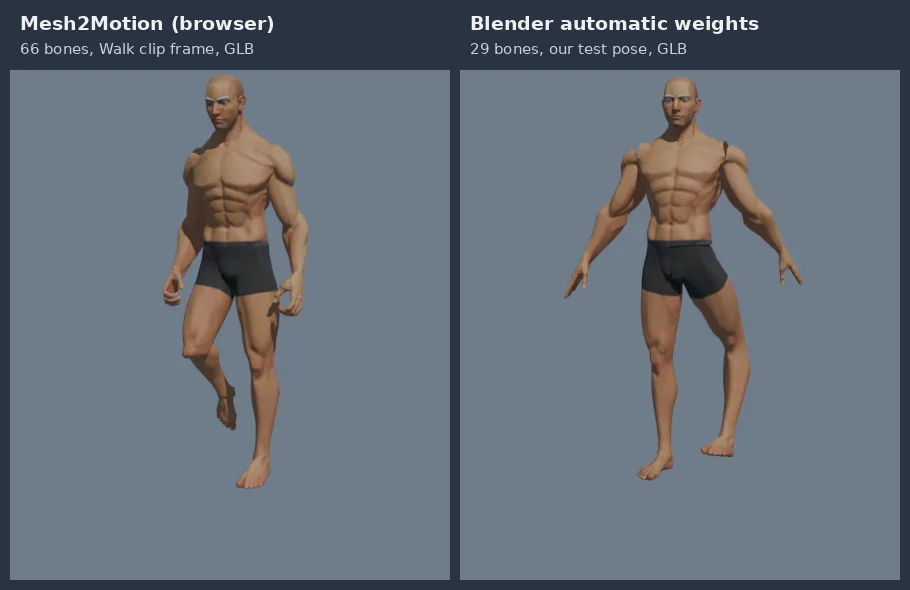
- Mesh2Motion (live app, no account): upload GLB, Human skeleton, default joint positions with no dragging, Finish, then picked Idle A, Walk and Jog from the 178 animations the library showed. The whole run took about 42 seconds in a scripted headless Chrome, and each download took under 3 seconds. The GLB was 15,784,040 bytes with a 66 bone skeleton (fingers included), 3 skinned meshes and 3 clips. The FBX was 12,663,340 bytes (binary FBX 7.4, Unreal preset). The files grew because Mesh2Motion re-saves the textures as PNG. The download settings also offer Mixamo bone names, a Unity FBX preset and a skeleton-only export.
- Blender automatic weights: Blender's bundled Rigify Basic Human meta-rig, scaled to the character, arm joints placed where we measured them on the mesh, then Parent with Automatic Weights. Weighting took 0.1 seconds, but 188 of 8,483 vertices (2.2%) got no weight: 124 around the eyes and eyebrows and 64 at the fingertips. We gave each one to its nearest bone with a few lines of Python. Result: 29 bones, GLB 11,311,484 bytes, FBX 5,114,812 bytes. Generating the full Rigify control rig from the same meta-rig made 222 bones, of which 35 deform; exporting deform bones only gave a 35 bone GLB and a 56 bone FBX (Blender kept the parent bones).
- Godot 4.7.2: every file loaded headless with one Skeleton3D: 66 bones and 3 animations for both Mesh2Motion files (Idle A played, 3.125 seconds), 29 bones for the Blender GLB and FBX, 35 and 56 for the Rigify exports.
- One surprise: Blender 5.2.3's FBX importer finished without an error but created no objects from the Mesh2Motion FBX, while the Mesh2Motion GLB imported fine with all 66 bones and 3 actions. If you plan to edit in Blender, download the GLB.
extends SceneTree
func _init():
	for f in ["m2m.glb", "m2m.fbx", "basic.glb", "rigify.glb"]:
		var doc = GLTFDocument.new() if f.ends_with(".glb") else FBXDocument.new()
		var st = GLTFState.new() if f.ends_with(".glb") else FBXState.new()
		doc.append_from_file("res://" + f, st)
		var root = doc.generate_scene(st)
		# then count Skeleton3D bones and list AnimationPlayer clips
	quit()
In a normal Godot project you just drag the GLB or FBX into the FileSystem dock. The script is only how we counted bones and clips without opening the editor.
What each tool's free plan really gives you
Mesh2Motion: the only no-account rigger that exports
Mesh2Motion is an open source take on Mixamo by Scott Petrovic. Its site says it runs in your browser with no subscription, imports GLB, GLTF, DAE and FBX, and exports several animations at once packed into a single GLB or FBX. Its GitHub README still says GLB or GLTF only, so GLB is the safest input; that is what we used. The models, rigs and animations are CC0 and the code is MIT, and its maker says no AI runs in the tool: the rigs and animations are hand made. The trade-off is fitting. Mesh2Motion gives you a skeleton to drag into place rather than an AI that finds the joints. With our clean T-pose character the default placement already gave usable Walk and Jog clips, but an odd shaped AI model will need a few minutes of dragging. It is the best free pick for animals and creatures, which Mixamo cannot rig.
Mixamo: free and royalty free, formats not on paper
Mixamo is free with an Adobe ID and needs no Creative Cloud subscription. Adobe's FAQ says you can use its characters and animations royalty free in personal, commercial and non-profit projects, including video games. The limits are about the model, not the money: bipedal humanoids only, no large extra parts like wings or tails, a neutral pose, nothing else in the file, and only your last character is stored. Adobe's rigging help lists FBX, OBJ and ZIP for upload but does not list the download formats, and we did not log in today, so we have not re-checked them. Mixamo vs AccuRIG compares it with the next option.
AccuRIG: free FBX and USD export, Windows only
AccuRIG is Reallusion's free desktop auto-rigger. Its FAQ (question 7) says it is free for personal and commercial use and points to the Reallusion Software EULA, adds that the sample characters inside it are covered by the separate Content EULA, and says any model you rig with it follows its own license. Question 8 says it runs on Windows only. The AccuRIG 2 manual shows Export FBX (Unreal, Unity, Blender, Maya, Cinema 4D, MotionBuilder, 3ds Max) or Export USD (Omniverse), with options for character only, motion only or both. The free version cannot edit skin weights and cannot rig the meshes of a multi-mesh character separately; those need the paid Character Creator. The latest release, 2.1.1 (September 29, 2026), fixed FBX export for non five finger skeletons in Unreal Engine 5. We could not test it because our machine runs Linux.
Blender and MCP for Blender: free, but you do the fitting
Blender is free with no account, and its license page says what you create with it is your sole property, including for commercial games. Rigify ships with it and gives you meta-rigs to fit; Parent with Automatic Weights skins the mesh. Exports are GLB or FBX. Our test shows the catch: automatic weights can leave small parts like eyes and fingertips unweighted, so check before you export. MCP for Blender (formerly blender-mcp) is a free, MIT licensed addon that lets Claude Code, Codex, Cursor and other AI apps run Blender Python for you, so the rigging and export are still Blender's. Its paid plans (Hobby $10, Pro $20, Studio $60, Max $100 a month) only add included AI 3D model generations. Its README says a minimal anonymous usage record is sent by default and setting DISABLE_TELEMETRY=true turns it off. We ran the same kind of Blender Python headless, not through MCP for Blender itself. For setup, see How to use Claude Code with Blender for game assets.
Cascadeur: rig and animate for free, but you cannot take it out
Cascadeur's plans page lists Free as free forever with the complete animation toolset, rigging tools, physics tools and inbetweening, but with export to .casc only (no .fbx or .dae) and non-commercial use only. That makes it a great place to learn animation and a dead end for a game file. Indie, $19 a month (cheaper billed yearly), adds CASC, FBX, DAE, USD and glTF export for revenue under $100,000 a year; Pro, $49 a month, removes the revenue limit. Mixamo vs Cascadeur covers the animation side.
Tripo and Meshy: rigging inside the generator, capped exports
Tripo's auto-rigging page says it rigs humans, quadrupeds, stylized characters and even mechanical creatures, takes OBJ, FBX or GLB uploads, and exports FBX or GLB with the skeleton. Its pricing page gives Free 200 credits a month (about 13 models) but only 15 exports a month, H2.5 models only, with public models and non-commercial use. Neither page says whether rigging is included on Free. Pro is $20 a month billed annually ($240 a year) for private models and commercial use.
Meshy's rigging docs say you can rig a humanoid or four-legged character, or any model with the beta Smart Rig (GLB download only), from a Meshy model or an upload up to 100 MB, and download it as FBX or GLB with a Mixamo skeleton template by default. On the Free and Starter plans the rig button reads Generate, so rigging runs on Free. Downloads are the limit: Meshy's help center says Free can download 10 untextured Meshy 6 Lite models a month, and textured models, textures applied to an uploaded model and Meshy 6, Meshy 7 or T2.5 models need a paid plan. It does not say whether rigging an untextured upload counts as one of the 10. Free outputs are CC BY 4.0, so credit Meshy if you ship them. Pro is $20 a month. More on both in Which free AI 3D model generators let you download?
Not in the table: Scenario for Blender can rig inside Blender, but it needs a paid Scenario plan, so it is not a free option.
How to rig and export a character for free
- Start with a model you can ship: your own, a CC0 character like the Quaternius one we used, or an AI model whose free plan allows commercial use. Rigging does not change the model's license.
- Pose it: T-pose or A-pose, arms away from the body, one character, centered, feet on the ground. Our rigging tutorial has a Blender cleanup script.
- Pick the rigger: Mesh2Motion for no account or a creature, Mixamo for a humanoid with ready animations, AccuRIG on Windows, Blender for full control. Skip Cascadeur Free and Tripo Free for a game you sell.
- Export only what you need: GLB for Godot and three.js, FBX for Unity and Unreal, and only the clips you will use. Next steps are in How to animate a 3D character for free.
- Test it in your engine before you build on it: count the bones, play one clip, and keep a note of the tool, date and license for every file.
What we did not test
- Mixamo, AccuRIG, Tripo, Meshy and Cascadeur. Mixamo, Tripo and Meshy need an account and we did not sign up; AccuRIG needs Windows; Cascadeur Free cannot export a game file anyway. Their rows come from official pages on November 17, 2026.
- Mesh2Motion with a non-human skeleton, or with FBX or DAE input. We only uploaded a GLB humanoid.
- MCP for Blender itself. We ran Blender Python headless, which is what the addon would send to Blender.
- Rig quality under heavy motion. We checked that each rig loads, plays and bends in a simple pose, not that every animation looks perfect.
Tools in this guide
Mesh2Motion
Free, open source auto-rigging and animation tool that runs in your browser, like an open Mixamo. Fits a skeleton to humans, animals, dragons and more, then exports animations as GLB or FBX.
Pricing: Free. Beginner rating: 5/5. Runs in your browser with no account or subscription: upload a model, pick a skeleton type, fit the bones, choose animations and export.
Free, open source, no account. GLB or FBX export with bundled animations, CC0 assets. Our test: 66 bones, 3 clips, loads in Godot 4.7.2.
Mixamo
Free Adobe service that auto rigs characters and applies ready made animations.
Pricing: Free. Beginner rating: 5/5. Free, drag and drop rigging and animations.
Free with an Adobe ID, royalty free for games, humanoids only.
AccuRIG
Free desktop auto-rigging app from Reallusion. You place joint guides on a humanoid character in an A or T pose, it builds the skeleton and skin weights, and you export a rigged FBX for Unity, Unreal or Blender, or USD.
Pricing: Free. Beginner rating: 4/5. A guided five step desktop app: load your model, check the joint guides, rig, and export. You need to install it and log in with a Reallusion account.
Free Windows auto-rigger with FBX or USD export. Its FAQ says commercial use is allowed.
Blender
Free, open source 3D app for modeling, UV unwrapping, texturing, baking, rigging and animation. It imports and exports glTF/GLB, FBX and OBJ, so it is the free workbench for fixing and texturing AI-generated models before they go into Godot, Unity or Unreal.
Pricing: Free. Beginner rating: 4/5. Free with no account, and it does almost everything, but the interface is big and a beginner needs a tutorial for UVs, materials and baking.
Free Rigify and automatic weights with GLB or FBX export. Check for unweighted vertices.
MCP for Blender
Free, open-source Blender addon and MCP server (formerly blender-mcp) that lets Claude Code, Codex, Cursor and other AI apps model, texture and arrange scenes in Blender for you. It can pull in Poly Haven, Sketchfab and Poly Pizza assets and generate AI 3D models.
Pricing: Freemium, from $10/mo. Beginner rating: 3/5. One install command sets up Blender and your AI app, then you describe what to build in plain English. You still need Blender installed and a little patience with the connection.
Free MIT addon that lets your AI app run Blender, including rigging scripts.
Cascadeur
Character animation software with AI assisted physics and posing.
Pricing: Freemium, from $19/mo. Beginner rating: 4/5. Real animation software with a learning curve.
Free rigging and animation, but .casc only and non-commercial. Export from $19 a month.
Tripo
Generates 3D models from text or images, with auto rigging options.
Pricing: Freemium, from $20/mo. Beginner rating: 5/5. Quick results and beginner friendly UI.
Rigs in the generator; Free has 15 H2.5 exports a month, non-commercial.
Meshy
Turns text or images into textured 3D models ready for game engines.
Pricing: Freemium, from $20/mo. Beginner rating: 4/5. Very easy text or image to 3D workflow.
Rigging runs on Free; Free downloads are 10 untextured Meshy 6 Lite models a month, CC BY 4.0.
Related
Step by step rigging: How to rig an AI-generated 3D model for free. Next, animation: How to animate a 3D character for free and How to use Mixamo animations in Godot 4. Need a model first? See which free AI 3D model generators let you download. Comparing riggers: Mixamo vs AccuRIG and Mixamo vs Cascadeur. Browse every animation tool or grab a free character from the Quaternius packs.
Sources, checked November 17, 2026: Mesh2Motion site, Mesh2Motion app and Mesh2Motion GitHub README; Mixamo FAQ and Mixamo rigging help; AccuRIG page, AccuRIG FAQ, AccuRIG 2 export manual and AccuRIG release notes; Blender license; MCP for Blender GitHub and MCP for Blender plans; Cascadeur plans; Tripo pricing and Tripo auto-rigging; Meshy pricing, Meshy rigging docs and Meshy Free plan help; Quaternius Universal Base Characters. Tests on November 17, 2026 with Blender 5.2.3, headless Chrome and Godot 4.7.2.
FAQ
Which free auto-rigging tools let you export a rigged character?
Four of the tools we checked on November 17, 2026 let you export a rigged character for free and use it in a game you sell: Mesh2Motion (GLB or FBX, no account), Mixamo (free with an Adobe ID), AccuRIG (FBX or USD, Windows only) and Blender with Rigify or automatic weights (GLB or FBX), which is also what MCP for Blender drives. Cascadeur Free rigs but only saves .casc files and is non-commercial. Tripo Free exports only 15 H2.5 models a month and is non-commercial. Meshy rigs on Free, but Free downloads are limited to 10 untextured Meshy 6 Lite models a month under CC BY 4.0.
Is Mesh2Motion really free with no account?
Yes. We used the live app at app.mesh2motion.org on November 17, 2026 with no account: uploaded a CC0 Quaternius character as GLB, picked the Human skeleton, kept the default joint positions, added three animations and downloaded both a GLB (15,784,040 bytes, 66 bones, 3 clips) and an FBX (12,663,340 bytes). Both loaded in Godot 4.7.2. Its site says the models, rigs and animations are CC0 and the code is MIT licensed.
Can I export from Cascadeur for free?
Not to a game engine. Cascadeur's plans page (checked November 17, 2026) says the Free plan includes the complete animation toolset and rigging tools, but exports to .casc only, with no .fbx or .dae, and is for non-commercial use only. FBX, DAE, USD and glTF export start on Indie, $19 a month, for revenue under $100,000 a year.
Does Mixamo let you download rigged characters for free?
Yes. Adobe's Mixamo FAQ says Mixamo is free with an Adobe ID and needs no Creative Cloud subscription, and that characters and animations are royalty free for personal, commercial and non-profit projects, including video games. Its rigging help says you upload FBX, OBJ or ZIP, and the auto-rigger works on bipedal humanoids only. Adobe's public pages do not list the download formats, and we did not log in today.
Is AccuRIG free for commercial use?
Its FAQ says yes: AccuRIG is free for personal and commercial use under the Reallusion Software EULA, while the sample characters inside it fall under the Content EULA and any model you rig keeps its own license. The same FAQ says AccuRIG runs on Windows only. The AccuRIG 2 manual lists FBX export (Unreal, Unity, Blender, Maya, Cinema 4D, MotionBuilder, 3ds Max) and USD export.
Can I export a rigged model from Tripo's free plan?
Only in a limited way. Tripo's pricing page (checked November 17, 2026) lists 15 exports a month on Free, H2.5 models only, with public models and non-commercial use. Its auto-rigging page says rigged models export as FBX or GLB, but neither page says whether rigging is included on Free or whether a rigged export counts against the 15. Commercial use needs Pro, $20 a month billed annually.
Can I download a rigged Meshy model on the free plan?
Rigging itself runs on Free: Meshy's rigging docs say that on the Free and Starter plans the rig button reads Generate. Downloads are the catch. Meshy's help center says Free can download 10 untextured Meshy 6 Lite models a month, and textured models, textures applied to an uploaded model and Meshy 6, Meshy 7 or T2.5 models need a paid plan. Free outputs are CC BY 4.0, so credit Meshy if you sell a game with them.
